

Recently VERY RECENTLY, the way to add spawners has changed and I wanted to help those confused on how to use it, it's pretty straightforward but there's still it's ups and downs I wanted to talk about too C:
So to first open this up you need to right click the spawner you're curious about and it will open up this menu :
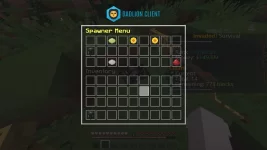
the menu should look like this (my pack makes it look different my apologies C:
anyways, there's 2 sunflowers, a green dye, and a gray dye thingy on the bottom. (The redstone is also there but that's to exit the menu, to do this action easier you can close the menu with the same menu you open inventory with C: )
The top row consists of a green dye as well as two sunflowers.
green dye - this is available for when you have another spawner OF THE SAME TYPE in your inventory. Clicking this will allow you to add more spawners (This is also the same as placing the same spawner types next to each other.)
sunflowers - both sunflowers serve the same purpose but it's just a tad bit faster than shop is when you're looking to buy more spawners. The one on the left helps you buy 1 spawner and automatically adds it on to the spawner you opened the menu on. This is the same with the right sunflower except instead on 1 spawner you're buying 10 spawners.
REMOVING SPAWNERS
When removing spawners you can silk touch the spawner to take the spawner (YOU NEED A RANK TO DO THIS) or you can click the icon on the bottom row, (when owning multiple spawners it will look like this)
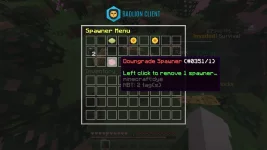
All you have to do is simply click the red dye and it will automatically give you the spawner in your inventory C:
Ups and Downs
Downs :
When I say there's "Downs" there really is only one downside that people would focus on the most. This is the fact that people ARE in fact able to remove spawners with containertrust. This GUI is able to be opened to people /containertrusted and they WILL be able to take away spawners from YOUR spawners. But, this also disabled the fact you're no longer able to place carpets on the spawners. (This does not change any aspect of the gameplay. Some players used to put carpets on their spawners just to hide their spawner count and such)
What does this impact ?
This impacts the people that don't know how to protect their spawners and make public farms without safely securing their spawners. This led to many people losing their spawners from making public farms because they were not alerted of this new change and the fact their spawners are now vulnerable to being stolen by anyone.
How can I prevent stolen spawners?
Spawners themselves are unable to be locked by a lock sign. In this case you need to be careful and lock them in more "creative ways."
Placing spawners like this :
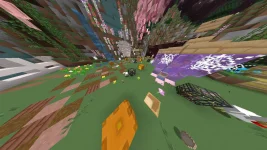
(ignore my FOV, I use quake pro so i can see more in bw C: )
But open spawners ARE able to be locked. Placing a door above or below the spawner with a lock ON THE DOOR will also lock your spawner above/below the door. This will make it so that spawner is only accessible to the owner of the sign lock.
Example :

Or, if you have the traditional blaze/spider spawner grinder you can also lock your spawners by surrounding them with ore blocks and locking the ORES with a sign lock.
Example :

Upside :
So the one MAJOR upside i see to this is that Defaults (nons) can now pick up some of their spawners without having to ask a rank to remove them. But, with the exception they can minimize their spawners to a minimum of ONE. This would mean defaults would need to ask a ranked person to remove the last spawner. This would also increase the trust in other people when asking them to remove a spawner. If they have a high amount of spawners, the loss of only one won't impact them as much as it would if they were to ask a ranked person to remove all their spawners.
This also impacts the fact that we no longer have to lose a lot of spawners to clearlag. If you want a spawner removed you can simply just remove them all in the spawner GUI. The only risk you would have is losing a most likely maximum of one spawner if you actually use the gui.
EDIT : the farm modeling is the Team X / Derrens farm come visit us to grind our blazes/spiders and chickens!
So to first open this up you need to right click the spawner you're curious about and it will open up this menu :
the menu should look like this (my pack makes it look different my apologies C:
anyways, there's 2 sunflowers, a green dye, and a gray dye thingy on the bottom. (The redstone is also there but that's to exit the menu, to do this action easier you can close the menu with the same menu you open inventory with C: )
The top row consists of a green dye as well as two sunflowers.
green dye - this is available for when you have another spawner OF THE SAME TYPE in your inventory. Clicking this will allow you to add more spawners (This is also the same as placing the same spawner types next to each other.)
sunflowers - both sunflowers serve the same purpose but it's just a tad bit faster than shop is when you're looking to buy more spawners. The one on the left helps you buy 1 spawner and automatically adds it on to the spawner you opened the menu on. This is the same with the right sunflower except instead on 1 spawner you're buying 10 spawners.
REMOVING SPAWNERS
When removing spawners you can silk touch the spawner to take the spawner (YOU NEED A RANK TO DO THIS) or you can click the icon on the bottom row, (when owning multiple spawners it will look like this)
All you have to do is simply click the red dye and it will automatically give you the spawner in your inventory C:
Ups and Downs
Downs :
When I say there's "Downs" there really is only one downside that people would focus on the most. This is the fact that people ARE in fact able to remove spawners with containertrust. This GUI is able to be opened to people /containertrusted and they WILL be able to take away spawners from YOUR spawners. But, this also disabled the fact you're no longer able to place carpets on the spawners. (This does not change any aspect of the gameplay. Some players used to put carpets on their spawners just to hide their spawner count and such)
What does this impact ?
This impacts the people that don't know how to protect their spawners and make public farms without safely securing their spawners. This led to many people losing their spawners from making public farms because they were not alerted of this new change and the fact their spawners are now vulnerable to being stolen by anyone.
How can I prevent stolen spawners?
Spawners themselves are unable to be locked by a lock sign. In this case you need to be careful and lock them in more "creative ways."
Placing spawners like this :
(ignore my FOV, I use quake pro so i can see more in bw C: )
But open spawners ARE able to be locked. Placing a door above or below the spawner with a lock ON THE DOOR will also lock your spawner above/below the door. This will make it so that spawner is only accessible to the owner of the sign lock.
Example :
Or, if you have the traditional blaze/spider spawner grinder you can also lock your spawners by surrounding them with ore blocks and locking the ORES with a sign lock.
Example :
Upside :
So the one MAJOR upside i see to this is that Defaults (nons) can now pick up some of their spawners without having to ask a rank to remove them. But, with the exception they can minimize their spawners to a minimum of ONE. This would mean defaults would need to ask a ranked person to remove the last spawner. This would also increase the trust in other people when asking them to remove a spawner. If they have a high amount of spawners, the loss of only one won't impact them as much as it would if they were to ask a ranked person to remove all their spawners.
This also impacts the fact that we no longer have to lose a lot of spawners to clearlag. If you want a spawner removed you can simply just remove them all in the spawner GUI. The only risk you would have is losing a most likely maximum of one spawner if you actually use the gui.
EDIT : the farm modeling is the Team X / Derrens farm come visit us to grind our blazes/spiders and chickens!
Last edited:

 was a bit hard to understand what the picture with the door meant because I couldn't see the spawner, but i figured it out after a minute LMAOO i think i'm just slow