

Pickup Filter Guide & Tips
----------------------------------------------------
Hey Guys,
I'm sure that some of you know what the pickup filter on Kit PvP is, but surprisingly, not a lot of other people do. On top of that, even those who know that the filter exists still have a tough time using it. While this is definitely a positive thing that makes it easier to sort through loot on Invaded, it can also be a bit confusing and quite annoying if not dealt with properly. In this guide I'll be going over what the pickup filter is and how to effectively utilize it on Kit PvP.
----------------------------------------------------
Server IP: invadedlands.net
Gamemode: Kit PvP
----------------------------------------------------
What is the Pickup Filter?
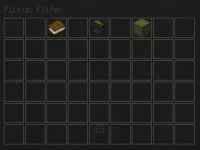
The Pickup Filter is a tool that is accessed via /pickupfilter on Kit PvP that allows players to choose what they want to pick up off the floor. The filter is consistent throughout the entire gamemode; it is not limited to just one area and will work even when you are not at spawn (let's say at player warps).

----------------------------------------------------
How do I use the Pickup Filter?
To first know how to use the filter, one must know how to add items to the filter itself first. To add an item, one must left-click on the anvil located in the middle of the top part of the menu. Doing so should bring up an anvil menu.
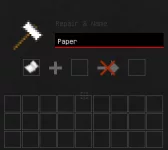
Next, type in the proper name of the item to be filtered (e.g. Iron Sword)
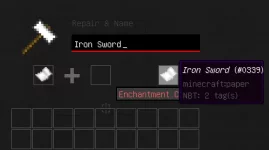
If you followed the steps correctly, the item should have appeared in the original Pickup Filter Menu. If you ever want to remove it, simply left-click on it and it will disappear.
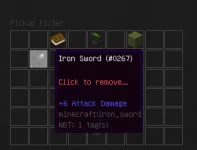
Simply repeat the steps with different items each time to add them to the filter. Items in the Pickup Filter Menu will be subject to the other options available in the menu (explained below).
----------------------------------------------------
Is There Only One Way to use the Pickup Filter?
There is actually more than just one way to successfully utilize the pickup filter. However, for the sake of learning, I'm going to go over the two most popular and basic ways to use it.
Option 1: Blacklisting Items
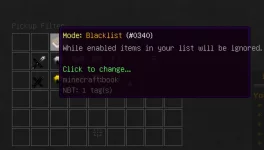
This option revolves around picking up everything BUT the items that are blacklisted in the Pickup Filter. Being the more popular of the two basic methods, it focuses on allowing any item that one hasn't added to the menu be picked up. Some things to add would be iron and stone swords, iron and gold armor, glass bottles, cooked beef, and arrows. To use the Blacklist Mode, make sure that the book at the top left of the Menu is set to "Blacklist."
Option 2: Whitelisting Items
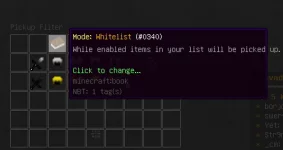
This option focuses on picking up ONLY the items that are in the Menu. This method is best for people who know exactly what they want to pick up and don't want anything else in their inventory. Some things to add to this would be diamond swords and armor, bows, ender pearls, potions, and other useful items. To use Whitelist Mode, make sure that the book at the top left of the Menu is set to "Whitelist."
----------------------------------------------------
How do I Make Sure It Works?
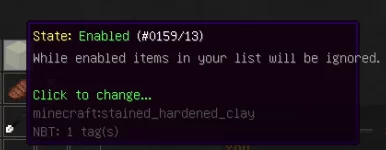
The selected function (blacklist / whitelist) will only work if State is set to "Enabled." To do so, one must left-click on the clay located at the top right of the menu and make sure it is green. If done correctly, it should look something like this:
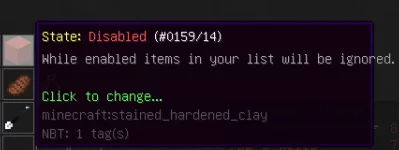
If the filter is disabled, it should look something like this:
----------------------------------------------------
Some people to give credit to:
@ApexWasabi - Followed his format from https://invadedlands.net/threads/punishment-appeal-guide-and-tips.24/ & was inspired to make this thread because he was making guides
@ash - Telling me to make this thread
----------------------------------------------------
That's about it. If you have any questions please feel free to fire away below and I'll try to answer them to the best of my abilities.
Thanks,
Joy
----------------------------------------------------
----------------------------------------------------
Hey Guys,
I'm sure that some of you know what the pickup filter on Kit PvP is, but surprisingly, not a lot of other people do. On top of that, even those who know that the filter exists still have a tough time using it. While this is definitely a positive thing that makes it easier to sort through loot on Invaded, it can also be a bit confusing and quite annoying if not dealt with properly. In this guide I'll be going over what the pickup filter is and how to effectively utilize it on Kit PvP.
----------------------------------------------------
Server IP: invadedlands.net
Gamemode: Kit PvP
----------------------------------------------------
What is the Pickup Filter?
The Pickup Filter is a tool that is accessed via /pickupfilter on Kit PvP that allows players to choose what they want to pick up off the floor. The filter is consistent throughout the entire gamemode; it is not limited to just one area and will work even when you are not at spawn (let's say at player warps).
----------------------------------------------------
How do I use the Pickup Filter?
To first know how to use the filter, one must know how to add items to the filter itself first. To add an item, one must left-click on the anvil located in the middle of the top part of the menu. Doing so should bring up an anvil menu.
Next, type in the proper name of the item to be filtered (e.g. Iron Sword)
If you followed the steps correctly, the item should have appeared in the original Pickup Filter Menu. If you ever want to remove it, simply left-click on it and it will disappear.
Simply repeat the steps with different items each time to add them to the filter. Items in the Pickup Filter Menu will be subject to the other options available in the menu (explained below).
----------------------------------------------------
Is There Only One Way to use the Pickup Filter?
There is actually more than just one way to successfully utilize the pickup filter. However, for the sake of learning, I'm going to go over the two most popular and basic ways to use it.
Option 1: Blacklisting Items
This option revolves around picking up everything BUT the items that are blacklisted in the Pickup Filter. Being the more popular of the two basic methods, it focuses on allowing any item that one hasn't added to the menu be picked up. Some things to add would be iron and stone swords, iron and gold armor, glass bottles, cooked beef, and arrows. To use the Blacklist Mode, make sure that the book at the top left of the Menu is set to "Blacklist."
Option 2: Whitelisting Items
This option focuses on picking up ONLY the items that are in the Menu. This method is best for people who know exactly what they want to pick up and don't want anything else in their inventory. Some things to add to this would be diamond swords and armor, bows, ender pearls, potions, and other useful items. To use Whitelist Mode, make sure that the book at the top left of the Menu is set to "Whitelist."
----------------------------------------------------
How do I Make Sure It Works?
The selected function (blacklist / whitelist) will only work if State is set to "Enabled." To do so, one must left-click on the clay located at the top right of the menu and make sure it is green. If done correctly, it should look something like this:
If the filter is disabled, it should look something like this:
----------------------------------------------------
Some people to give credit to:
@ApexWasabi - Followed his format from https://invadedlands.net/threads/punishment-appeal-guide-and-tips.24/ & was inspired to make this thread because he was making guides
@ash - Telling me to make this thread
----------------------------------------------------
That's about it. If you have any questions please feel free to fire away below and I'll try to answer them to the best of my abilities.
Thanks,
Joy
----------------------------------------------------
Last edited:
