0

Play Now

Click to Copy IP

Oh no...

Status
Not open for further replies.

Oh no...

noone

Active member
IAmAGamerYes
IAmAGamerYes
I tried to fix my mic but then I went into control panel, clicked properties on my headphones, then clicked properties and then change settings and then clicked "Disable" and restarted. I can't find it anywhere on how to fix it. I searched up many tutorials and nothing worked!

I just wanted to tell people my problem and an answer would be good I want to use this computer. When I mean answer I mean on how to fix this problem. I also used administrator if you wanted to know (Even though you need to use that to do it). I am also checking the website hoping I will get a response on how to fix it. Also why did I not go on a different website? I can't post anything.
 
Last edited:
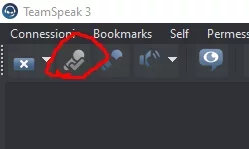
I tried to fix my mic but then I went into control panel, clicked properties on my headphones, then clicked properties and then change settings and then clicked "Disable" and restarted. I can't find it anywhere on how to fix it. I searched up many tutorials and nothing worked!

I just wanted to tell people my problem and an answer would be good I want to use this computer. When I mean answer I mean on how to fix this problem. I also used administrator if you wanted to know (Even though you need to use that to do it). I am also checking the website hoping I will get a response on how to fix it. Also why did I not go on a different website? I can't post anything.
what mic is it
 
I'm really sorry but I have to
4cd599364fa414b0d4632c04a775b5c6.jpg
 
I tried to fix my mic but then I went into control panel, clicked properties on my headphones, then clicked properties and then change settings and then clicked "Disable" and restarted. I can't find it anywhere on how to fix it. I searched up many tutorials and nothing worked!

I just wanted to tell people my problem and an answer would be good I want to use this computer. When I mean answer I mean on how to fix this problem. I also used administrator if you wanted to know (Even though you need to use that to do it). I am also checking the website hoping I will get a response on how to fix it. Also why did I not go on a different website? I can't post anything.
Don't worry the problem was fixed with Microsoft. Go into Device Manager then go to sound after that click the one you want to enable (Or click them all like I did I got it on my second try) then go to Driver and click Enable. It will be there in Control Panel and it will be Communication Device so click Set Default you are done no restarting.

Remember the rustling sound? It was my microphone. Yep, my microphone. It kept disabling every round in SCP Secret Laboratory.

Also can someone request a lock I don't know how to do it. Okay I do know but what ones? I'm just a guy on the InvadedLands forums (Best one in my opinion).
 
Last edited:
Status
Not open for further replies.
Off Topic
Back