

You are using an out of date browser. It may not display this or other websites correctly.
You should upgrade or use an alternative browser.
You should upgrade or use an alternative browser.
Chat colour text
- Thread starter CoocaCola
- Start date
Chat colour text
Are you talking about in game? If you are, your message format should be like this. &2Hello everyone, &Fmy name is CoccaCola! The &2 is green and the &F is white. It should turn out like this, Hello everyone, my name is CoccaCola! Note: You have to have access to green chat by getting permissions for it in a seasonal crate key.
Thats not working, when I type &f it still shows up as the colour i used originally
that's because you don't have white chat unlocked. and idk if you can unlock itThats not working, when I type &f it still shows up as the colour i used originally
The default chat color is whitethat's because you don't have white chat unlocked. and idk if you can unlock it
There is a special color in Minecraft called reset (color coee &r) and it's the same as &f (white). We already know that, but you can't reset it back to the default text after using smth like &a (green) cuz the text will continue to be green until you put another color code (like &c (red) or &f (white))The default chat color is white
So for example if you have every color code it would look like this:
&cThis is&a a test &fmessage
This is a test message
But if you don't have red & white it will look like this:
&cThis is a test &fmessage
Are you talking about in game? If you are, your message format should be like this. &2Hello everyone, &Fmy name is CoccaCola! The &2 is green and the &F is white. It should turn out like this, Hello everyone, my name is CoccaCola! Note: You have to have access to green chat by getting permissions for it in a seasonal crate key.
it's not &F, it's &f...
All color codes are lowercase and exist from 0 ~ 9, a ~ f (k, l, m, n, o, r are special color codes).
Image form for reference
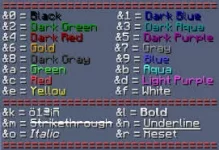
Also, you can't use &r nor &f without the perms and you can't get &r so ????? &f hasn't been a acquirable color in ages.
Last edited:
Share:
General Discussion