

Hey Invaded Players,
I got banned for my double clicking mouse. I didnt even know, that it is doing so. Luckliy, my appeal got accepted. Obviously, my first objective was to find a way to fix the double clicking problem on my Logitech G pro wireless.
After doing a lot of research, I stumbled across a fix that I want to share with you.
Please keep in mind that this fix I´ll show you only apply´s for Logitech mice.
You could use a programm like x-mousbutton control, to set a debounce time so that your mouse doesnt double click anymore. The programm sadly is really unstable, not really working and not giving you a fix up until about 100ms debounce time. (Wich is hilarious).
The real and easy fix is actually the Logitech software (G-Hub)
We all know, that this software sucks ass in so many ways. But with a little trick, you are able to eliminate the issue.
(My software is in German, so sorry already)
I will try my best to explain it step by step:
Step 1:
Open Logitech G-Hub software and go to the MACRO Tab.
Step 2:
Inside the MACRO tab create a new one and call it what you want.
Step 3:
Chose the type of macro. Select the last one of the 4.
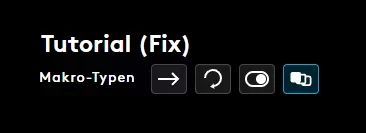
Step 4:
Disable the standard latency time.
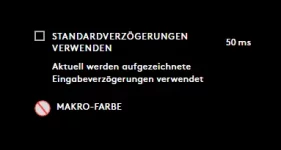
Step 5:
Record a macro on "While Hold" tab. (First of the 3).
Simply hold your left mouse button for 2 seconds and release it.
It should now look something like this:
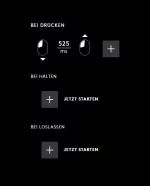
Now do the same on "While release".
It should look like this now:
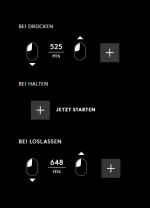
Were almost there!
Step 6:
Delete the release click on "while hold" as well as the press click on "while release". (Left click and press "del keybind")
should look like this:
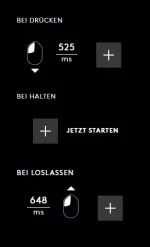
Now just left click drag the time (ms) from "while release" to the right side and press ENTER.
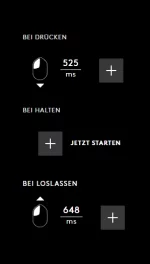
And now its up to you to find the best "ms" time to reduce double clicks. Just left click the time and reduce / higher it to what you want.
As a comparison my logitech g pro wireless stops double clicking at about 40ms ish.
(My example):
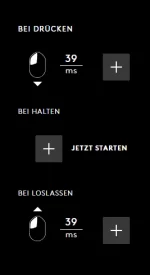
LAST STEP:
Simply just save the macro and drag it onto your left click button. Thats it!!
Hopefully you can understand what I showed you here.
I know, I know.. This will take a hit to your ingame cps. I went down from around 16 ish to about 12 ish. This sounds bad, and it is. BUT I dont want to get banned again for such a thing I wasnt even aware of. Now I am and I am happy to share my fix to you guys.
Hopefully this can help anyone out there with a logitech mouse. Would appriciate some feedback. Incase you run into any problems, dont hesitate to reply with your question. I will try my best to solve it.
Carlo
(Please reduce my ban even more. I cant live for 30 days without playing skeppylands. I beg)
I got banned for my double clicking mouse. I didnt even know, that it is doing so. Luckliy, my appeal got accepted. Obviously, my first objective was to find a way to fix the double clicking problem on my Logitech G pro wireless.
After doing a lot of research, I stumbled across a fix that I want to share with you.
Please keep in mind that this fix I´ll show you only apply´s for Logitech mice.
You could use a programm like x-mousbutton control, to set a debounce time so that your mouse doesnt double click anymore. The programm sadly is really unstable, not really working and not giving you a fix up until about 100ms debounce time. (Wich is hilarious).
The real and easy fix is actually the Logitech software (G-Hub)
We all know, that this software sucks ass in so many ways. But with a little trick, you are able to eliminate the issue.
(My software is in German, so sorry already)
I will try my best to explain it step by step:
Step 1:
Open Logitech G-Hub software and go to the MACRO Tab.
Step 2:
Inside the MACRO tab create a new one and call it what you want.
Step 3:
Chose the type of macro. Select the last one of the 4.
Step 4:
Disable the standard latency time.
Step 5:
Record a macro on "While Hold" tab. (First of the 3).
Simply hold your left mouse button for 2 seconds and release it.
It should now look something like this:
Now do the same on "While release".
It should look like this now:
Were almost there!
Step 6:
Delete the release click on "while hold" as well as the press click on "while release". (Left click and press "del keybind")
should look like this:
Now just left click drag the time (ms) from "while release" to the right side and press ENTER.
And now its up to you to find the best "ms" time to reduce double clicks. Just left click the time and reduce / higher it to what you want.
As a comparison my logitech g pro wireless stops double clicking at about 40ms ish.
(My example):
LAST STEP:
Simply just save the macro and drag it onto your left click button. Thats it!!
Hopefully you can understand what I showed you here.
I know, I know.. This will take a hit to your ingame cps. I went down from around 16 ish to about 12 ish. This sounds bad, and it is. BUT I dont want to get banned again for such a thing I wasnt even aware of. Now I am and I am happy to share my fix to you guys.
Hopefully this can help anyone out there with a logitech mouse. Would appriciate some feedback. Incase you run into any problems, dont hesitate to reply with your question. I will try my best to solve it.
Carlo
(Please reduce my ban even more. I cant live for 30 days without playing skeppylands. I beg)