
My screen records black

You are using an out of date browser. It may not display this or other websites correctly.
You should upgrade or use an alternative browser.
You should upgrade or use an alternative browser.
Help with OBS
- Thread starter RougeNebula
- Start date
- Status
- Not open for further replies.
Help with OBS
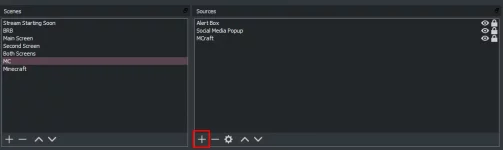
What source do you have? Please take a screenshot.
( I suggest you add the Game Source and select the javaw.exe or BadLionClient.exe or the wich you are using )
( I suggest you add the Game Source and select the javaw.exe or BadLionClient.exe or the wich you are using )
Yea do game capture first, but if you can't get that working, use display capture.What source do you have? Please take a screenshot.
( I suggest you add the Game Source and select the javaw.exe or BadLionClient.exe or the wich you are using )
Got it now the replay buffer isnt saving
Got it now the replay buffer isnt saving
Settings Configuration
- Open your settings by clicking the
Settingsbutton.- Navigate to
Output, and change your output mode from Simple to Advanced.- Next, go to the
RecordingTab and change all of the settings how you would like them. Most aren't important, but you should change your recording path to something you will be able to remember. This is where your replays will be saved. If you are unsure about the other settings, either leave them blank or google "Best OBS Recording Settings," and a ton of video guides will come up.- Next, navigate to the
Replay BufferTab and Check the box to enable it. I set the Maximum replay time to 120 seconds, but pick something that you think will work.- Finally, go to your
HotkeysSection on the left and change your hotkey for saving a replay buffer.
OK I GOT IT IT WAS SAVING SOMEWHERE OTHER THAN WHERE I THOUGHT IT WAS

Ok
Sorry
- Status
- Not open for further replies.
Share:
Off Topic