
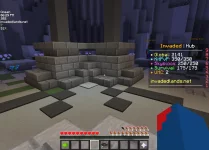
the jagged pixels on the wool and un allinged pixels on the stone

it was not like this before i messed with the settingsThere was a forum post made about this the other day and it didn't seem like there was a way to fix it that anyone knew of. I honestly don't see that much of a difference, but I think it had something to do with the graphics cards people were using although I am not completely sure. @System64 might be able to give a little better input than I can.
Older screens, or screens with a 1280x1024 resolution, often have those problems. It has to do with the Anti Aliasing, I haven't bothered taking a look at how to fix it, it's not too much of an inconvenience. I can look up some pages if you want. @Toast thank you for mentioning me on this thread. Try using optifine and seeing if it improves, and look up "anti aliasing jagged edges minecraft" on google.it was not like this before i messed with the settings
I missed with sum settings im testing it out, it fixed the lines but made objects far away more blurryOlder screens, or screens with a 1280x1024 resolution, often have those problems. It has to do with the Anti Aliasing, I haven't bothered taking a look at how to fix it, it's not too much of an inconvenience. I can look up some pages if you want. @Toast thank you for mentioning me on this thread. Try using optifine and seeing if it improves, and look up "anti aliasing jagged edges minecraft" on google.
No matter the resolution. These will still happen. Higher resolutions only smooth out textures further away along with mip mapping.Older screens, or screens with a 1280x1024 resolution, often have those problems. It has to do with the Anti Aliasing, I haven't bothered taking a look at how to fix it, it's not too much of an inconvenience. I can look up some pages if you want. @Toast thank you for mentioning me on this thread. Try using optifine and seeing if it improves, and look up "anti aliasing jagged edges minecraft" on google.
im getting 300fps because if it, its making my game proformace on high, (without ur suggestion)Download optifine and go to quality. Next set anti aliasing to whatever you prefer. You can not fix this with setting it a higher resolution. You need to add mipmapping or anti aliasing to smooth them out. Anti aliasing does cut a lot of performance on 16x.
Do you have mip mapping on?im getting 300fps because if it, its making my game proformace on high, (without ur suggestion)
What is your res, settings, nividia settings and gpu?im getting 300fps because if it, its making my game proformace on high, (without ur suggestion)
yesDo you have mip mapping on?
I set it to defult so people could send me thier settingsWhat is your res, settings, nividia settings and gpu?
its on quallityOn the nividia control panel, you can change how well the picture you want it to look like. Performance adds these jagged lines. Quality removes most of them. Antialiasing just smoothes it out.
Then its minecraft not youits on quallity
What texture pack you use?its on quallity
old faithful 16x16What texture pack you use?
ss ur nvidia settingsWhat texture pack you use?
???? Im not the one having problemsss ur nvidia settings
so i can see them smh???? Im not the one having problems