

You are using an out of date browser. It may not display this or other websites correctly.
You should upgrade or use an alternative browser.
You should upgrade or use an alternative browser.
I cant login
- Thread starter 3z6
- Start date
Could you possibly send a screenshot of what you're seeing? It would help a lot more.
Attachments
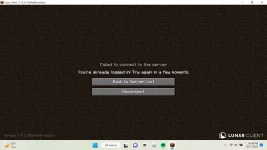
Normally when that happens to me, I just keep reconnecting until it works, if this doesn’t work, here are a few methods you can try.
1. Patience
Loading into a server immediately after logging into Minecraft can cause errors like this, it creates too many entries which causes this to show up.
2. Restart Minecraft
Close Minecraft and go back into it, this can get rid of any mess ups or bugs.
3. Join a different server
This could just be a bug for certain servers due to too many failed attempts, try logging onto a different server then try the previous one again.
4. Hacked?
This probably and most definitely isn’t the case, but it is possible. Make sure your account is secure.
5. Network
Check your network to make sure it is the correct option, an incorrect Wi-Fi or no Wi-Fi could be a problem.
6. Contact Mojang/Minecraft support
It isn’t always a bug that can be fixed by the player, if the error is still not working after many methods and tries, this is the best option.
Hopefully one of these methods can help you.
1. Patience
Loading into a server immediately after logging into Minecraft can cause errors like this, it creates too many entries which causes this to show up.
2. Restart Minecraft
Close Minecraft and go back into it, this can get rid of any mess ups or bugs.
3. Join a different server
This could just be a bug for certain servers due to too many failed attempts, try logging onto a different server then try the previous one again.
4. Hacked?
This probably and most definitely isn’t the case, but it is possible. Make sure your account is secure.
5. Network
Check your network to make sure it is the correct option, an incorrect Wi-Fi or no Wi-Fi could be a problem.
6. Contact Mojang/Minecraft support
It isn’t always a bug that can be fixed by the player, if the error is still not working after many methods and tries, this is the best option.
Hopefully one of these methods can help you.
u
ur a nerdNormally when that happens to me, I just keep reconnecting until it works, if this doesn’t work, here are a few methods you can try.
1. Patience
Loading into a server immediately after logging into Minecraft can cause errors like this, it creates too many entries which causes this to show up.
2. Restart Minecraft
Close Minecraft and go back into it, this can get rid of any mess ups or bugs.
3. Join a different server
This could just be a bug for certain servers due to too many failed attempts, try logging onto a different server then try the previous one again.
4. Hacked?
This probably and most definitely isn’t the case, but it is possible. Make sure your account is secure.
5. Network
Check your network to make sure it is the correct option, an incorrect Wi-Fi or no Wi-Fi could be a problem.
6. Contact Mojang/Minecraft support
It isn’t always a bug that can be fixed by the player, if the error is still not working after many methods and tries, this is the best option.
Hopefully one of these methods can help you.
kid ur not getting staff stop no lifeingNormally when that happens to me, I just keep reconnecting until it works, if this doesn’t work, here are a few methods you can try.
1. Patience
Loading into a server immediately after logging into Minecraft can cause errors like this, it creates too many entries which causes this to show up.
2. Restart Minecraft
Close Minecraft and go back into it, this can get rid of any mess ups or bugs.
3. Join a different server
This could just be a bug for certain servers due to too many failed attempts, try logging onto a different server then try the previous one again.
4. Hacked?
This probably and most definitely isn’t the case, but it is possible. Make sure your account is secure.
5. Network
Check your network to make sure it is the correct option, an incorrect Wi-Fi or no Wi-Fi could be a problem.
6. Contact Mojang/Minecraft support
It isn’t always a bug that can be fixed by the player, if the error is still not working after many methods and tries, this is the best option.
Hopefully one of these methods can help you.
Its a problem with the server, the whole thing is down now.Normally when that happens to me, I just keep reconnecting until it works, if this doesn’t work, here are a few methods you can try.
1. Patience
Loading into a server immediately after logging into Minecraft can cause errors like this, it creates too many entries which causes this to show up.
2. Restart Minecraft
Close Minecraft and go back into it, this can get rid of any mess ups or bugs.
3. Join a different server
This could just be a bug for certain servers due to too many failed attempts, try logging onto a different server then try the previous one again.
4. Hacked?
This probably and most definitely isn’t the case, but it is possible. Make sure your account is secure.
5. Network
Check your network to make sure it is the correct option, an incorrect Wi-Fi or no Wi-Fi could be a problem.
6. Contact Mojang/Minecraft support
It isn’t always a bug that can be fixed by the player, if the error is still not working after many methods and tries, this is the best option.
Hopefully one of these methods can help you.
weirdass npcNormally when that happens to me, I just keep reconnecting until it works, if this doesn’t work, here are a few methods you can try.
1. Patience
Loading into a server immediately after logging into Minecraft can cause errors like this, it creates too many entries which causes this to show up.
2. Restart Minecraft
Close Minecraft and go back into it, this can get rid of any mess ups or bugs.
3. Join a different server
This could just be a bug for certain servers due to too many failed attempts, try logging onto a different server then try the previous one again.
4. Hacked?
This probably and most definitely isn’t the case, but it is possible. Make sure your account is secure.
5. Network
Check your network to make sure it is the correct option, an incorrect Wi-Fi or no Wi-Fi could be a problem.
6. Contact Mojang/Minecraft support
It isn’t always a bug that can be fixed by the player, if the error is still not working after many methods and tries, this is the best option.
Hopefully one of these methods can help you.
lololo fr this kid took it from the internet aswell literal npckid ur not getting staff stop no lifeing
Fabelz has removed this feature for Server Performanceis it just me or i cant login to invaded on my main account someone help
Believe it or not, this was all written by me. I used past experiences to type this all out.lololo fr this kid took it from the internet aswell literal
ugh i wishFabelz has removed this feature for Server Performance
earthteam > you in every conceivable waybro stop being a fake staff LOL Ur so cringe i used past experiences lolol kid is depressed irl
LOL now ur a nerdBelieve it or not, this was all written by me. I used past experiences to type this all out.
Normally when that happens to me, I just keep reconnecting until it works, if this doesn’t work, here are a few methods you can try.
1. Patience
Loading into a server immediately after logging into Minecraft can cause errors like this, it creates too many entries which causes this to show up.
2. Restart Minecraft
Close Minecraft and go back into it, this can get rid of any mess ups or bugs.
3. Join a different server
This could just be a bug for certain servers due to too many failed attempts, try logging onto a different server then try the previous one again.
4. Hacked?
This probably and most definitely isn’t the case, but it is possible. Make sure your account is secure.
5. Network
Check your network to make sure it is the correct option, an incorrect Wi-Fi or no Wi-Fi could be a problem.
6. Contact Mojang/Minecraft support
It isn’t always a bug that can be fixed by the player, if the error is still not working after many methods and tries, this is the best option.
Hopefully one of these methods can help you.

aint readin allatNormally when that happens to me, I just keep reconnecting until it works, if this doesn’t work, here are a few methods you can try.
1. Patience
Loading into a server immediately after logging into Minecraft can cause errors like this, it creates too many entries which causes this to show up.
2. Restart Minecraft
Close Minecraft and go back into it, this can get rid of any mess ups or bugs.
3. Join a different server
This could just be a bug for certain servers due to too many failed attempts, try logging onto a different server then try the previous one again.
4. Hacked?
This probably and most definitely isn’t the case, but it is possible. Make sure your account is secure.
5. Network
Check your network to make sure it is the correct option, an incorrect Wi-Fi or no Wi-Fi could be a problem.
6. Contact Mojang/Minecraft support
It isn’t always a bug that can be fixed by the player, if the error is still not working after many methods and tries, this is the best option.
Hopefully one of these methods can help you.
hold this ratio
you made him delete his comment lolearthteam > you in every conceivable way
doesnt change the player countFabelz has removed this feature for Server Performance

tell emaint readin allat
hold this ratio
Share:
General Discussion