

KeBugCheck (and KeBugCheckEx, both calling KeBugCheck2) is the Blue Screen of Death basically, when you call it from kernel mode you get a bugcheck (the intended name of a bluescreen)

You can get your bugcheck through a usermode executable (exe) if you run NtRaiseHardError with speciifc arguments, but that function isn't documented so you're pretty much on your own in terms of that.
A bugcheck switches the OS back into a kernel mode screen, you can see this in older versions of WIndows NT since in boot it writes to the same screen as the BSOD (like this via InbvDisplayString., and you yourself can write it to the bluescreen via NtDisplayString)
(bootscreen in NT 4, the bootscreen is the same as the bluescreen screen in this version)
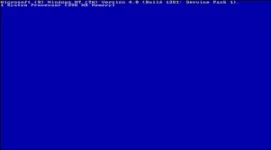 . . In modern version of windows however, the screen is instead drawn via a completely different way (not 100% sure).
In a windows 11 insider build (a prerelease build not in the public yet) theres now a new bluescreen without the =( face
Its now a Black Screen of Death, and in Insider builds it will be green. All of them being called by KeBugCheck (or KeBugCheckEx)
You can do stuff after the bugcheck by using KeRegisterBugCheckCallback (someone ran a linux emulator after the bluescreen!)
The KeBugCheck and KeBugCheckEx functions are both defined inside C:\Windows\System32\ntoskrnl.exe (The Windows Kernel)
(This bottom text is from MSDN, link is https://learn.microsoft.com/en-us/windows-hardware/drivers/ddi/ntddk/nf-ntddk-kebugcheck if you're interested)
The KeBugCheck routine brings down the system in a controlled manner when the caller discovers an unrecoverable inconsistency that would corrupt the system if the caller continued to run.
C++
void KeBugCheck(
[in] ULONG BugCheckCode
);
[in] BugCheckCode
Specifies a value that indicates the reason for the bug check.
None
A bug check is a system-detected error that causes an immediate, controlled shutdown of the system. Various kernel-mode components perform run-time consistency checking. When such a component discovers an unrecoverable inconsistency, it causes a bug check to be generated.
Whenever possible, all kernel-mode components should log an error and continue to run, rather than calling KeBugCheck. For example, if a driver is unable to allocate required resources, it should log an error so that the system continues to run; it must not generate a bug check.
A driver or other kernel-mode component should call this routine only in cases of a fatal, unrecoverable error that could corrupt the system itself.
KeBugCheck can be useful in the early stages of developing a driver, or while it is undergoing testing. In these circumstances, the BugCheckCode passed to this routine should be distinct from those codes already in use by Windows or its drivers. For a list of these codes, see Bug Check Codes.
However, even during driver development, this routine is of only limited utility, since it results in a complete system shutdown. A more effective debugging method is to attach a kernel debugger to the system and then use routines that send messages to the debugger or break into the debugger. For further information, see Get started with WinDbg (kernel-mode).
When a bug check is unavoidable, most system components call KeBugCheckEx, which provides more information about the cause of such an inconsistency than KeBugCheck.
Thats all for today, if this gets a decent response ill do another Windows Internals post, i can make mistakes so if I say anything wrong in this post please comment and correct me!
You can get your bugcheck through a usermode executable (exe) if you run NtRaiseHardError with speciifc arguments, but that function isn't documented so you're pretty much on your own in terms of that.
A bugcheck switches the OS back into a kernel mode screen, you can see this in older versions of WIndows NT since in boot it writes to the same screen as the BSOD (like this via InbvDisplayString., and you yourself can write it to the bluescreen via NtDisplayString)
(bootscreen in NT 4, the bootscreen is the same as the bluescreen screen in this version)
. . In modern version of windows however, the screen is instead drawn via a completely different way (not 100% sure).In a windows 11 insider build (a prerelease build not in the public yet) theres now a new bluescreen without the =( face
Its now a Black Screen of Death, and in Insider builds it will be green. All of them being called by KeBugCheck (or KeBugCheckEx)
You can do stuff after the bugcheck by using KeRegisterBugCheckCallback (someone ran a linux emulator after the bluescreen!)
The KeBugCheck and KeBugCheckEx functions are both defined inside C:\Windows\System32\ntoskrnl.exe (The Windows Kernel)
(This bottom text is from MSDN, link is https://learn.microsoft.com/en-us/windows-hardware/drivers/ddi/ntddk/nf-ntddk-kebugcheck if you're interested)
The KeBugCheck routine brings down the system in a controlled manner when the caller discovers an unrecoverable inconsistency that would corrupt the system if the caller continued to run.
Syntax
C++
void KeBugCheck(
[in] ULONG BugCheckCode
);
Parameters
[in] BugCheckCode
Specifies a value that indicates the reason for the bug check.
Return value
None
Remarks
A bug check is a system-detected error that causes an immediate, controlled shutdown of the system. Various kernel-mode components perform run-time consistency checking. When such a component discovers an unrecoverable inconsistency, it causes a bug check to be generated.
Whenever possible, all kernel-mode components should log an error and continue to run, rather than calling KeBugCheck. For example, if a driver is unable to allocate required resources, it should log an error so that the system continues to run; it must not generate a bug check.
A driver or other kernel-mode component should call this routine only in cases of a fatal, unrecoverable error that could corrupt the system itself.
KeBugCheck can be useful in the early stages of developing a driver, or while it is undergoing testing. In these circumstances, the BugCheckCode passed to this routine should be distinct from those codes already in use by Windows or its drivers. For a list of these codes, see Bug Check Codes.
However, even during driver development, this routine is of only limited utility, since it results in a complete system shutdown. A more effective debugging method is to attach a kernel debugger to the system and then use routines that send messages to the debugger or break into the debugger. For further information, see Get started with WinDbg (kernel-mode).
When a bug check is unavoidable, most system components call KeBugCheckEx, which provides more information about the cause of such an inconsistency than KeBugCheck.
Requirements
| Requirement | Value |
|---|---|
| Minimum supported client | Available starting with Windows 2000. |
| Target Platform | Universal |
| Header | ntddk.h (include Ntddk.h) |
| Library | NtosKrnl.lib |
| DLL | NtosKrnl.exe |
| IRQL | Any level |
Thats all for today, if this gets a decent response ill do another Windows Internals post, i can make mistakes so if I say anything wrong in this post please comment and correct me!