
Is it possible to change my admin password? I ask this since I can not download optifine. This is because of the Windows Admin Password. I got my computer 5 years ago (when i was 11) So my mom put herself as the admin. We dont remember it, so can someone please tell me if it is possible to change my admin password

You are using an out of date browser. It may not display this or other websites correctly.
You should upgrade or use an alternative browser.
You should upgrade or use an alternative browser.
question
- Thread starter Dababy
- Start date
question
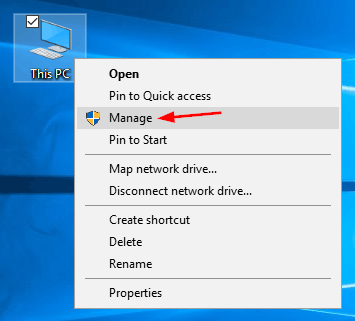
- Right-click on This PC icon on your desktop and then select Manage.
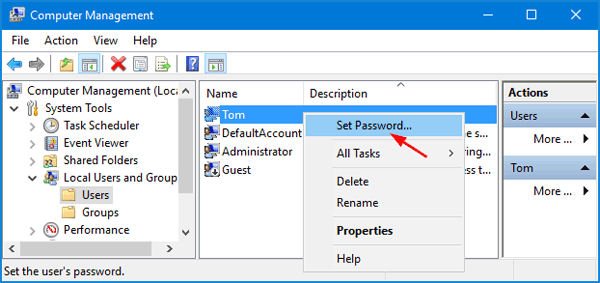
- In Computer Management, expand to Local Users and Groups -> Users in the left pane. Right-click on your desired user in the middle pane, and then select Set Password.
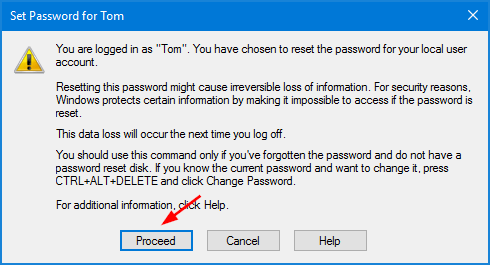
- Click the Proceed button to confirm.
- Enter your new password twice and click OK.

But this may help too!
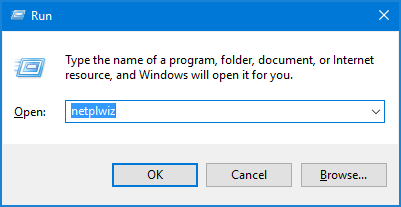
- Press the Windows + R keys together to open the Run box. Type netplwiz and hit Enter.
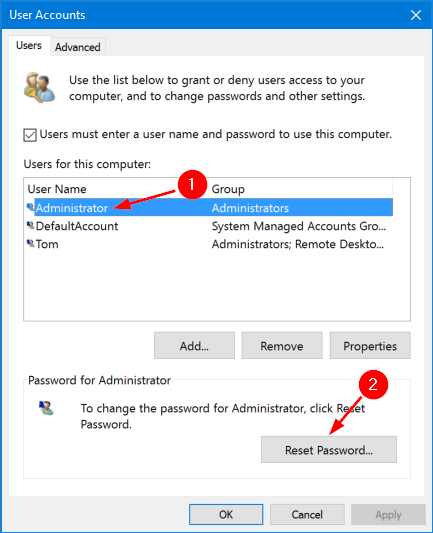
- In the User Accounts window, highlight a user account you would like to change password for, and then click the Reset Password button.
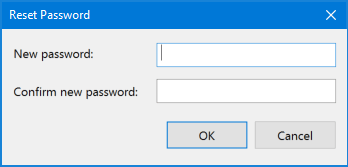
- Enter the new password for your user account, and then click OK.
Is there a possible way to do this when you arent on the admin account? If so please tell me, I really look forward to getting optifineBut this may help too!
- Press the Windows + R keys together to open the Run box. Type netplwiz and hit Enter.
- In the User Accounts window, highlight a user account you would like to change password for, and then click the Reset Password button.
- Enter the new password for your user account, and then click OK.
Is there a possible way to do this when you arent on the admin account? If so please tell me, I really look forward to getting optifine
That is what I got when I searched it up.
Ill keep looking thoughOh ok thank you for helping.
Share:
Off Topic